


Meet your device
Automatic detection gathers available hardware information. Supported display rates are never presented as measured game FPS.
Start with your phone. Refine with your playstyle.
Make every setting feel more like you.
SensiLab turns available RAM and display information into a consistent starting recommendation. Then your own gameplay guides the fine-tuning. No random rerolls. No guaranteed-headshot claims.
Automatic detection gathers available hardware information. Supported display rates are never presented as measured game FPS.
Choose Free Fire or Free Fire MAX, then Balanced, Headshot or Rush. Get six sensitivity controls and a fire-button starting recommendation.
Aim too high? Too low? Tune per scope, undo, reset and save. Compatible cloud baselines stay cached on your phone.
General, Red Dot, 2×, 4×, Sniper and Free Look. Keep your controls coherent, then adjust the ones that need attention.
A considered starting point across close-range movement and scoped aim. Tune each control as you practice.
A PREVIEW OF THE APP’S PLAYSTYLE OPTIONS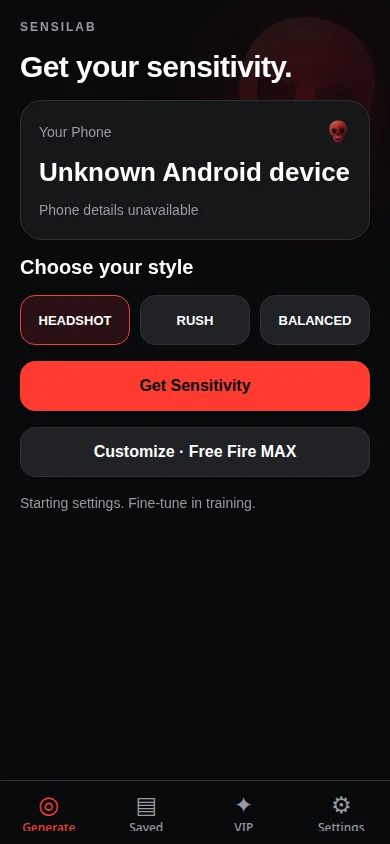
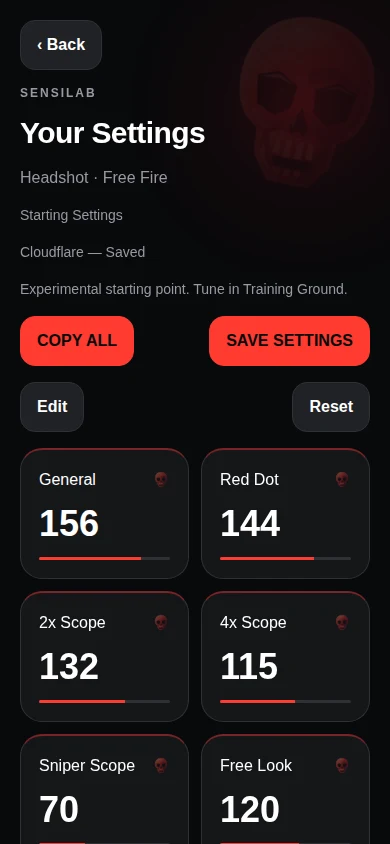
Real app interface, browser-rendered previews. Example values; your settings may differ.
Get personal one-on-one guidance on sensitivity, drag control and HUD adjustments. Purchase in the Android app, then arrange your consultation with our team.
Explore VIP consultationFree sensitivity generation does not require an account. Google Sign-In protects VIP purchases and your private bookings.
No. SensiLab offers experimental, device-informed starting points. Practice and personal calibration matter; no sensitivity can guarantee a headshot or a rank.
No. Supported refresh rates are hardware information, not a measurement of the game’s current frame rate or input latency.
Compatible recommendations already saved on your phone can be reused offline. If no compatible baseline exists and the cloud cannot be reached, the app clearly labels its offline fallback.
You purchase in the Android app, then contact our official support team with your verified booking ID. The team arranges the consultation externally; there is no in-app calling platform.